For pastors and church leaders
Your church is already gathering here.
If someone from your congregation sent you this link, your church has a page on THNK GOD and they are already using the app. THNK GOD is a place to pray, give thanks and read Scripture every day, on iPhone and Android — and each church in it has a page of its own. Yours is waiting for someone from leadership to set it up.
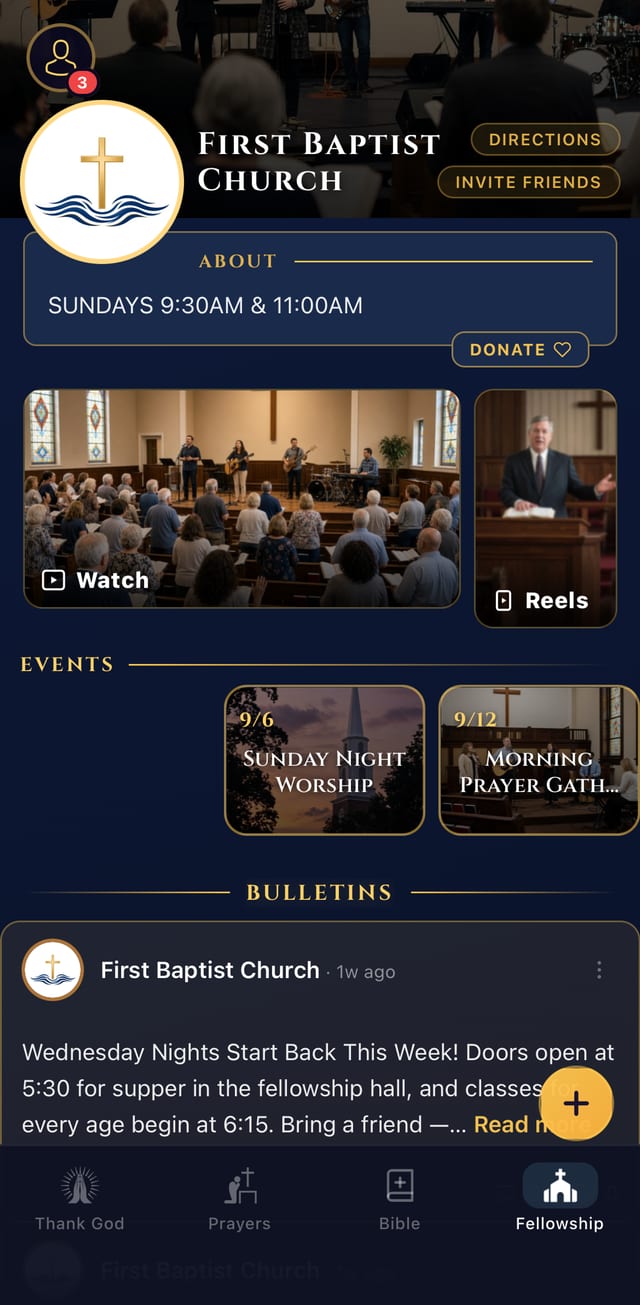
What your church's page carries
Members who join your church in the app find it in their Fellowship tab, beside the prayer journal and the Bible they already open.
Sunday’s service, and clips in between
Sermon video on the page, and short clips through the week for the people who missed it or want to hear it again.
The week’s events, and the bulletin
Service times, directions and what is coming up, with the bulletin posted where members will actually see it.
Posts and sermon notes from the leaders
A feed your leadership writes to — announcements, encouragement, and notes that carry Sunday into Wednesday.
Prayer the congregation carries together
Members bring requests to the church and pray for one another by name, with groups for the smaller circles inside it.
It runs on what you already do
Most church apps are one more thing for someone to keep updated. This one fills itself from the tools your church already uses.
YouTube
Sermons, posted for you
Link your church’s YouTube channel once. New services and videos appear on the page on their own.
Sermons
A summary of every sermon
Each sermon from your YouTube channel gets a short summary, the scriptures it covered, and a full transcript, automatically, so members can come back to it during the week.
Calendar
Events from your calendar
Paste your website’s events page or your calendar link — Google Calendar, Church Center, Outlook and others. Your events show up on the page and update when you change them.
Newsletter
Your newsletter becomes the bulletin
Add the address we give your church to your newsletter list. Each announcement arrives as a draft bulletin post for you to approve, or publishes on its own from senders you trust.
An app your members already open
Most church apps sit unopened on a home screen, because nothing in them is for Tuesday. Here, your members come for their own reasons first — a gratitude question each morning, their prayers, their reading plan — and the church’s page is one tab away when they do.
- A 365-day gratitude challenge, one question a day.
- A prayer journal that keeps the date a prayer was asked and the date it was answered.
- Nine Bible translations, four of them readable offline.
- Lessons, quizzes, and a study assistant that answers from classic commentary and points back to the text.
How setting up works
Three steps. The first two happen in the app on your phone; the third is a conversation with us.
-
Open your church in the app
Install THNK GOD, create an account with your email, and find your church in the Fellowship tab. If a member sent you here, it is already listed.

-
Verify that you lead it
On the church’s page, tap I’m a leader here — claim it. We mail a verification code to the church’s address, and you enter it in the app.
-
We set the page up with you
Once you are verified, we get your church’s page running and hand it to you and the leaders you choose.
Why a postcard? So that nobody can take over your church’s page just by saying they are the pastor. A code mailed to the church’s own address can only be opened by someone who receives the church’s mail. If the address we have is wrong, or mail there will not reach you, you can ask for manual verification instead.
Questions before you start?
Ask us anything about how it works or what your members will see.